Here's a follow up that started with this post about polish (scroll all the way down) and ended with yesterday's talk in class about what polish is exactly.
To recap: "If the blocking is correct and your breakdowns are in place, the polish phase should only enhance the animation, .... It's not there to change the [overall] timing."
Polishing your shot should not change the overall timing and idea of your acting choice, body movement, etc. But instead of writing down what I said yesterday, I will point you to a post about polish that I just read, found @ Synchrolux via Cooked Art's "Other News from the Grapevine...".
Just like a certain someone in our class who prefers to listen to his friends' advice as opposed to what is said in class, even though the advice is the same (I couldn't resist, I had to mention it! Your email still cracks me up! ;) ), you might understand or prefer to read about the aspect of polishing better when explained by someone else. And no, I'm not having a pity party or anything like that, it makes total sense. How many times did my parents tell me what to do and I never did, but when my friends said the same thing, I somehow got it. Wait, did I just compare myself to being a parent and you guys are my children? Hmm.... Anyway.
Even though no one had questions yesterday after that polish lecture, I'm just going to assume that you want to know more about it and hear/read an explanation presented in a more professional way, without me going off on a tangent talking about Bernie's ding dong. Wait, what?
One of the things I spoke about then was the need to treat the body as a connected whole — when the head moves, for example, the chest and shoulders are going to move, too. Without this nuanced connectedness, almost any movement looks unnatural.
polish rule number one: Polish simply takes time.
Rule number two: polish is subtle. If it made a huge difference, then it wouldn’t be polish, it would be animation.
The key to efficient polish comes BEFORE the polish phase. So first, do good animation.
Polishing takes forever when you’ve animated without really making a commitment to what you’re animating. It takes forever when you’re not completely clear in your mind what you want for that scene. You need to start with good, clear ideas.
There's a lot more to read and I can't just copy/paste the whole thing, so please head over to Kevin Koch's SynchroLux and read the post "How much polish is too much?"
You can also listen to John Kahrs' podcast about Polish. There are some great comments about time management and what is the most important part to fix and polish.
Here's another clip and the person was asking why the animation looks so spliney.
> so is it like a matter of timing?
Absolutely. The reason why it feels so spliney is because everything is always moving, there are no holds, no pauses. The section that works the best is from x162 to x218 (roughly), because he lifts the suitcase and rests for a movement, which makes sense in that situation. But before and after you never feel like any body part gets a break, everything is always moving somehow, but not in a keep alive way, it's just too busy. By having everything move you don't create enough contrast, it makes the audience restless and then bored because there is nothing to focus on and it makes your character look like he's just a puppet and not a living, thinking being.
> So what should I be looking to do, technically... just move keys around to tight things up? Make the tangents flatter for holds? Is this like a small thing to fix or a major thing...? Almost yes, kinda yes, and depends. :)
Almost yes, because you do need to move the keys around to tighten things up, but you still have to think about where and why. The movements need rhythm, it needs to have a sense of flow. So when he gets hit by the shoe at the end, have him take the hit, the when he's done with the movement screen left, hold that moment, because he's trying to make sense of that situation "Wait, what just happened? Did I get hit?", then have him turn around and look at the door because he realized what happened "SHE hit me!". Kinda yes, because you do need to have holds and flattening the tangents will help, but you don't want to start flattening tangents left and right. You need to be very selective about the moments where nothing moves and even then, the body needs to have little drifts so that it doesn't look dead. Look at the previous critique on the class site for a good example of holds and keep alive. Depends, because it all depends on your sense of timing and rhythm. So if you have a good understanding of that, it's just a technical fix, so it's small, but if you struggle with the concept and adjusting the timing, then it can be a major fix.
The funny thing is, the animation can reflect someones personality at times. If someone is very bouncy and animated in person, with big facial expression changes and stuff like that, it can show up in the animation. But of course not always and some people who are very slow, just down in terms of feeling and attitude, can create really alive and animated performances.
> I feel like I'm missing the last step of polishing.. like I don't know how to take it further. So... I start out with all the blocking steps you went over... reference, block a pose every 5 frames or so, tangents on linear... then move keys around so I like the timing. Then blocking plus, add more keys for in betweens, if needed. Then for polishing.. the tools I use are... the graph editor and "perfect arc." Ok I know what your going to say... dry erase marker. Is that all I'm missing? maybe.... ok im going to go out and buy one right now.
Hahaha, you don't HAVE to use the dry erase, "perfect arc" works as well. Whatever you prefer to use to track down your curves and arcs. I just like the dry erase because it's fast and simple. Your workflow sounds good, there is nothing wrong there, but don't get too worked up over the technical side. Act out your shot, get a feel for the timing. If you would act out your clip exactly the way you animated it, you would be able to tell what's wrong. So act it out, over and over again, film yourself and study the footage, but first just in terms of timing. Don't start picking it apart for animation details or stuff like that, just observe where you move and where you don't move. But really be in the moment and act it out. Don't pretend and shortcut moments, don't act it out in front of someone because people tend to talk and explain what they're doing instead of actually doing it.
> Oh I know a lecture topic I'd like to hear about... maybe you could elaborate on the "polishing" step of your workflow? I think that's where I get messed up. I think my timing is better in my blocking phase and then things get a little messy when I try to polish.
That's a very good point. I've seen many examples where the blocking has great timing, but then the polished version lost its appeal. A lot of times it's because the holds you had, the pauses you get from animating linear or stepped, are gone due to all the spliney stuff (leaving you with the guy caressing his leg, from x262 to x280 - there's no need to have that hand move around like that, just put in on his leg, add some adjustment on his fingers, add some leg movement since there is added weight and pressure on it from this hand/arm, that's it). If the blocking is correct and your breakdowns are in place, the polish phase should only enhance the animation, get rid of sudden stops, add detail to facial expressions, fingers, contact points, give the overall moments the last little touch of rhythm and life. It's not there to change the timing. It reminds me of lunch, the days when I get the salad to go from the buffet. I put everything in a box. I know this is going to sound really weird... All the different things are in my box and that represents your blocking. All that is needed is the dressing. So I put that on top of the spots that need dressing. That's your polish. But what happens to many people is this: they close the box and start shaking it. Hey, the dressing/polish is everywhere, right? Makes it yummy. That's what you do, no? Put dressing over everything? Now it's all polished. Nope, you just made everything messy and lost the initial appeal of your work/salad. Only add dressing/polish where it is needed.
...
Ok, that comparison was really weird. But the moment of shaking my salad box just reminded me of how animation can get all messed up once you tweak your blocking too much. :)
I know, I'm kinda late with the whole "Lost" thing, but time is precious, unfortunately I can't watch all the shows that interest me. Since I hate working out (it's just really boring to me), I put a TV in front of the elliptical machine, but even that didn't motivate me enough (I know, I suck), until I started watching "Lost", now I can't wait to go work out and watch another episode. Please don't spoil anything, I'm almost done with Season 1 so I have a lot to catch up. :)
Anyway, I thought the first pilot episode had a lot of good examples of more complex physical acting choices, both broad and subtle, compositional choices, animation ideas, etc. just lots of good detail stuff which you might find useful. Here we go:
(clip) => nice composition with the plane and background. You can treat the look of your set like a "golden pose", that one pose which tells the story in broad strokes. It would also be neat to use it as an establishing shot (similar to what I mentioned about the "Sleeping Beauty" shot). Everything is moving except Jack, making him stick out, which is an effective use of contrast both in terms of movement and color (his dark suit in front of the lighter plane shell).
(clip) => "... On account of three!" Because it's so loud it's okay to act out the line (showing the "three" count with his fingers), otherwise no (you might get busted for using an audio clip with hard to hear voices though).
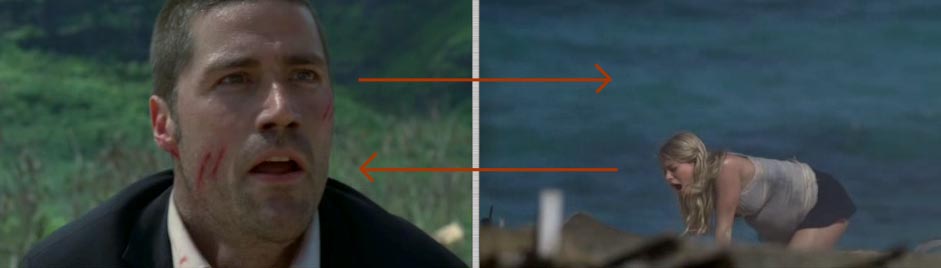
(clip) => Jack hears the girl screaming, looks around and sees her screen right, she is positioned looking screen left. So in context, they are looking at each other (for a broader explanation, see the "Acting Reference: Die Hard" post).
(clip) => the way he runs is cool and interesting because of the set. It adds variety,complexity and a purpose, which is better than just a generic run cycle.
(clip) => I would avoid the "jump-fall-with-big-explosion-in-the-background-thing" with your characters. Might just be me, but I think it's overused (just like the lower eyelid twitch), unless you are going for a very intentional cheese factor.
(clip) => Charlie doesn't react the way the audience would expect - toying with people's expectations keeps it interesting - within this episode it also acts as a contrast to all the serious moments, giving the audience a moment of relief through unexpected comedy (sheesh, sounds so important...)
(clip) => Hurley falls and sand is sticking to his face - nice detail incorporating the environment. Definitely something to be done AFTER your animation is polished ad nauseam, but I'd love to see detail work like that.
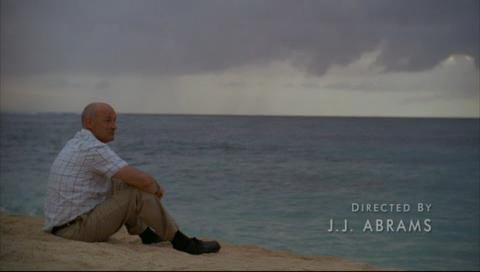
=> Locke staring at the ocean. I know, simple, but I like the composition because it is so simple and clear. Sometimes less is more.
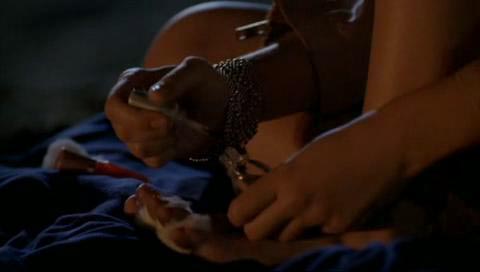
=> the girl is in a horrible, desolate situation, yet she paints her nails, making her look superficial since the most important thing to her is her appearance instead of gathering food or helping wounded people; or it's her only way at the moment to cope with the situation, maybe a way to distract herself, or it's a relaxing thing to do (again as a distraction or coping mechanism), or she is so sure that help will come that she isn't worried and passes time (still revealing that she cares more about herself than others) - there are many interpretations possible, but my point is that this moment reveals part of her character (whatever it may be). Touches like that can make your shot much more interesting and stand out. So let's say you have a dialogue clip (a monologue or dialogue) and it's fitting to have your character(s) stranded on an island, I think most beginning animators would have the character(s) act out the scene standing up, probably with broad gestures (which I think is a natural thing to do as you start out, since you want to "show" that you understand the animation principles). A shot with one or two guys sitting around, doing nothing, just talking, might not exactly scream "demoreel material", but to me would be much more challenging (and rewarding), more interesting to see and it's less of a cliché. Now imagine that the (or one of the) character(s) is painting her (or his?) nails while delivering the lines, that would add even more character and also contrast with the setting (doing something mundane in a scary situation).
Long story short, present the character with a conflict and show the audience the choices he/she/it makes in order to deal with that situation. Those choices will reveal their true character (and make your shot much more interesting).
(clip) => an unexpected punch line - just as the audience thinks the shot is done you give them one more thing (can easily drift into cliché territory though (someone gets eaten by a creature and just as you think the shot is done the creature spits out a single bone), so use with care).
(clip) => foreshadowing - I only recently started with "Lost", nearing towards the end of season one. As I was watching the pilot again (because I wanted to write about the sand-sticking-on-Hurleys-face part which now grew into a bigger post), I noticed this shot and Kates reaction to Jacks plane model. (no worries, I won't spoil anything in case you haven't seen the show and plan to). Her distressed face makes sense within this sequence, but it is also foreshadowing an event that happens toward the end of this season. Foreshadowing something in a single shot can be very difficult, but it reminds me of something else (in a roundabout way) that you can use in your shot which I don't see too often, the fact that the audience knows more than the character in your shot. Chaplin was a master of that. It's a great way to create tension and comedic situations.
(clip) => break up the timing - watch how she shakes her head, how it is not an evenly timed left right left right, how the rhythm keeps changing (even though I doubt that you would see a character do so many head shakes in an animated feature, but let's just talk in terms of principles).
(clip) => the ice cubes! Observe real world situations and incorporate interesting details into your shot - yes, yes, animation comes first, make sure your story is clear and that your animation is readable, BUT... Once you're in polish land it's time to add the fun details. So free yourself from the computer and observe the real world. Try to find moments which let the audience connect with your character. This can be character traits or set interactions which give the audience a "Hey, I know that feeling!", or "That happens to me too!" moment. So in this case, as Jack downs his drink, at a certain tipping point the ice cubes roll over (giving you those cold and wet lips, which just happened to me with my glass of orange juice, in a plane as well (yes, I wrote this on the flight back to SF)). Might just be me but I enjoy those moments in movies ("The Incredibles" had many moments like that with Dash reminding me of my son).
(clip) => guide your audience - you are in control and you can manipulate the audience's focus in many ways using light, colors, composition, sound, movement (or lack thereof) and in this case through depth of field. I see this technique used on the AM showcase reels every now and then and I always like it because of it's "professional" look. Again, detail stuff, worry about the animation first, but it's easy to do in post using After Effects and gives your shot a more interesting look.
=> interesting reveal - not that you want to have just fingers in a shot for your reel (although if it is a short shot within a sequence it could work). Let's say you have multiple characters in your shot, it could be neat to reveal one of them in an interesting way (or if it isn't a character it could be an important object)
=> it's all about timing! Locke mentions something and smiles, and as the audience realizes the importance of it, so does the woman, but she doesn't want to spoil the moment by laughing or commenting on it, yet she wants to know how the other guy reacts to Locke's comment. So that eye dart is more of a sneaky type, a bit more tense than a usual look around, hence no eye blink. The timing is also great, with her eye dart happening after her smile, so that the audience can linger on her face and register her smile, which tells us that she understood what Locke meant, but it's all very subtle. (this part is from episode 4, season 1)
Someone suggested a best-of list for easier browsing, so here are posts which people seemed to like the most. If you feel that there is a post missing, please leave a comment or email me, and I'll add it, thanks!
Someone suggested that there should be some sort of "best-of" section with the most helpful and important posts. That's a great idea, unfortunately I don't know which ones I should list. For that I need your feedback. Through some research I found out that blogger will soon add a "post rating" system, which will be very helpful. There is a widget for that already, but the template I'm using is not happy with that right now (working on a fix).
Ratul Sarna wrote up a great post with a list of his favorite AAU/Spungella posts (thanks!). I will start with that and if you feel that there are other posts that should be on this list, please leave a comment or email me.
I will add a link to this said list to the left hand navigation menu, called "Best-of Spungella" for direct access.